Closing port 445: SMB, Windows Firewall and lateral movement
Why SMB on port 445 is the door worms walk through, how a host-based Windows Firewall rule closes it, and how to check from outside that the rule holds.
Contents
On 12 May 2017 the WannaCry ransomware began encrypting computers, and within days it had reached more than 200,000 of them in some 150 countries, hospitals in England’s National Health Service among them. Nobody had to open an attachment. It arrived through port 445 using EternalBlue, an NSA exploit for Windows’ SMBv1 server that a group calling itself the Shadow Brokers had published in April; Microsoft had patched the flaw in March, in MS17-010. Six weeks later NotPetya used the same exploit against companies in Ukraine and far beyond. Once one machine on a flat network falls, SMB is how an attacker, or a worm, walks to the next.
 Custom rule blocking inbound SMB traffic (port 445) applied to all network profiles.
SMB, Server Message Block, is Windows’ file and printer sharing protocol. This post blocks it on one host with Windows Defender Firewall with Advanced Security.
Why port 445 is a risk
| Threat type | Description |
|---|---|
| Wormable exploits | Port 445 was the entry point for EternalBlue, and so for WannaCry and NotPetya |
| Lateral movement | Attackers use SMB to move between machines in a domain |
| Remote execution | Unpatched SMB services can allow unauthenticated code execution |
| Enumeration vector | SMB reveals shares, system names and users to attackers |
None of this needs the port to be reachable from the internet. Internal exposure is the risk that matters once any machine on the network is compromised.
Steps taken
1. Opened the firewall console
Running wf.msc opens Windows Defender Firewall with Advanced Security.
2. Reviewed the existing rules
Under Inbound Rules, sorted by port, the machine had:
- File and Printer Sharing (SMB-In) enabled on Private networks
- Allow rules for TCP 445 (SMB directly over TCP), UDP 137 (the NetBIOS name service) and UDP 138 (the NetBIOS datagram service), all part of the file-sharing stack
3. Created a custom inbound block rule
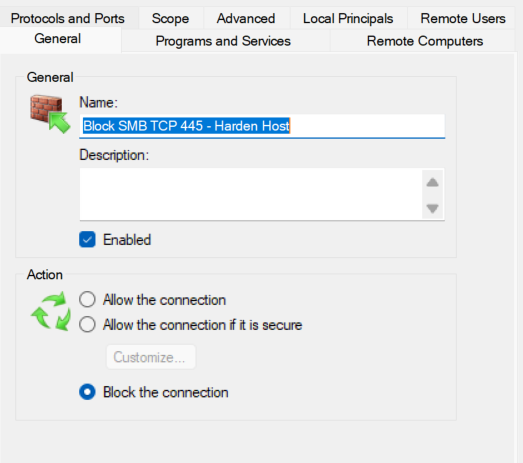 The block rule’s properties: enabled, action set to block the connection.
- Rule Type: Port
- Protocol: TCP
- Port: 445
- Action: Block the connection
- Profile: All (Domain, Private, Public)
- Name:
Block SMB TCP 445 - Harden Host
The same rule can be made from PowerShell, which is the form worth keeping if more than one machine needs it:
New-NetFirewallRule -DisplayName "Block SMB TCP 445 - Harden Host" -Direction Inbound -Protocol TCP -LocalPort 445 -Action Block
Where the rule sits in the list does not matter. Windows Firewall has no rule order: a block rule beats any matching allow rule wherever the two appear, unless the allow rule is set to “Override block rules,” which Windows permits only for IPsec-authenticated connections. The screenshot’s Override column reads No throughout, so the block wins.
Verification and testing
The check belongs on a second machine on the same network, where an attacker would stand:
nmap -p 445 192.168.X.XX
A port blocked by Windows Firewall gives no answer at all, so Nmap should report it as filtered. open means the rule is not doing its job, and closed means something on the host answered with a reset.
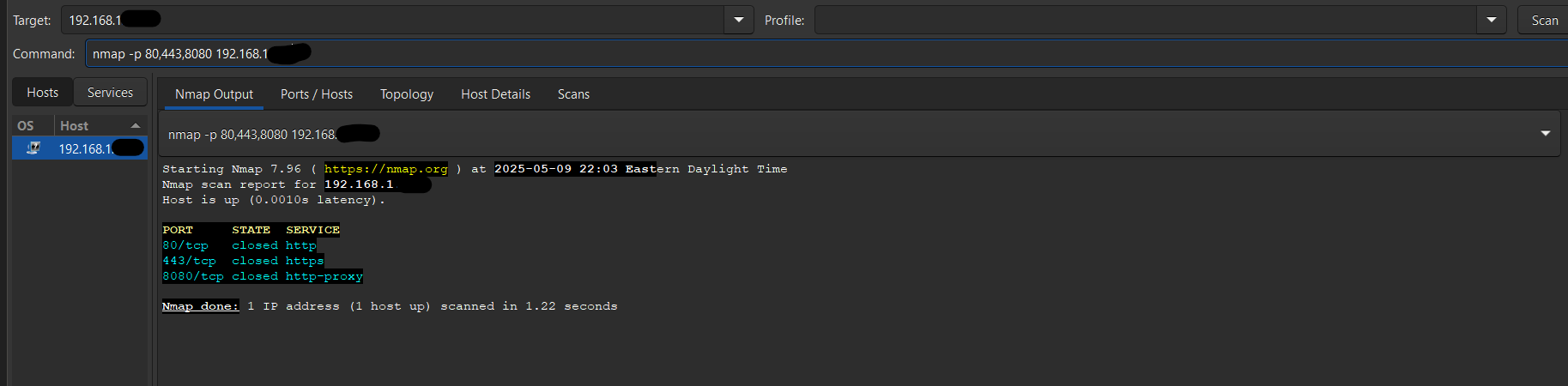 An Nmap check of ports 80, 443 and 8080 on the host after the change: all three answer closed.
The screenshot is of a different check, against ports 80, 443 and 8080. All three came back closed: the host answered with resets, so it was up, but the scan says nothing about port 445.
What the rule costs
Blocking inbound 445 on every profile means this machine can no longer share folders or printers. It can still open shares elsewhere, because the rule covers only inbound traffic. For a workstation that serves nothing, that is no loss.
SMBv1, the protocol EternalBlue attacked, is not installed by default on Windows 10 from version 1709 onward; Get-WindowsOptionalFeature -Online -FeatureName SMB1Protocol in an elevated PowerShell shows whether it lingers on an upgraded machine. Patching still comes first. The firewall rule is for the day patching is late.
Sources
- Microsoft. Security Bulletin MS17-010, “Security Update for Microsoft Windows SMB Server,” 14 March 2017.
- Microsoft. “Windows Firewall rules” documentation, on rule precedence.
- Microsoft. “SMBv1 is not installed by default in Windows 10 version 1709, Windows Server version 1709 and later versions.”
- National Audit Office. Investigation: WannaCry cyber attack and the NHS. October 2017.