Credentials in the clear: what plain HTTP gives away
A Wireshark capture on Wi-Fi that turned up a username and password token sent over plain HTTP, and why TLS is the only defence that travels with the request.
In October 2010, at ToorCon in San Diego, Eric Butler released a Firefox extension called Firesheep. On an open Wi-Fi network it collected the session cookies other people’s browsers sent to Facebook, Twitter and a few dozen other sites over plain HTTP, and offered a one-click login as each of them. The attack was as old as those sites. What Firesheep changed was how long the explanation took, and within a few years the large sites had moved to HTTPS. From July 2018 Chrome marked every plain-HTTP page “Not secure.” Plain HTTP did not vanish, though. Much of it moved into software that talks to the network without a window.
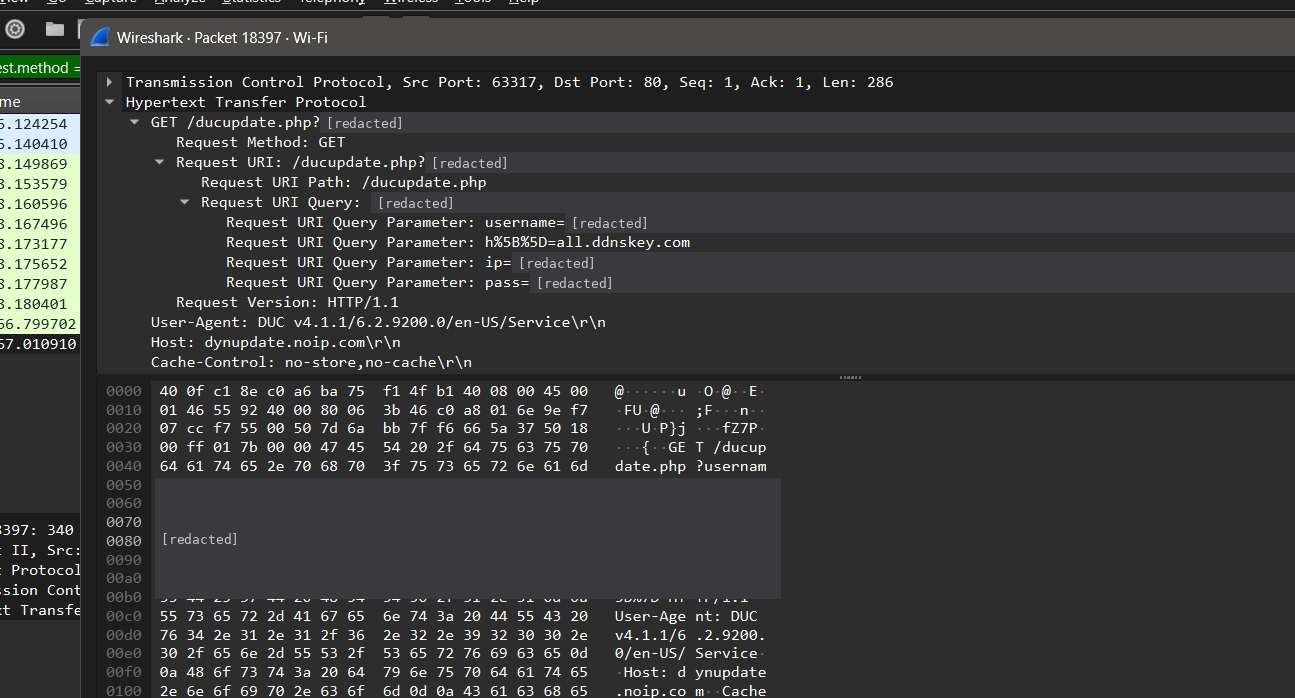 A captured HTTP request carrying a username and a password token in clear text.
How it was done
- Started a Wireshark capture on Wi-Fi.
- Visited
http://neverssl.comto trigger unencrypted HTTP traffic. - Used the filter
http.request.method == "POST"to isolate form submissions. - Located the request carrying credentials in plain text.
NeverSSL is a page that never redirects to HTTPS, kept so that a laptop behind a captive portal has something plain to load. The POST filter catches form submissions, where a browser login would appear. The request that turned up with credentials was a GET, though, which http.request.method == "GET", or simply http.request, will show.
What the capture showed
The packet went to port 80 from a background update client for a dynamic DNS service, the kind of small program that tells a DNS provider when a home connection’s address changes. Its request line carried:
username=<account>andpass=HMAC%7B<key>%3D%7Din the query string- the HTTP headers, all readable, the client’s name and version among them
%7B, %7D and %3D are URL-encoded braces and an equals sign, so the password field reads HMAC{...}, a token rather than a plain password. Over plain HTTP that helps little. Unless the token changes with every request, whoever copies it can replay the request, and to the server a replayed token is as good as the password. A GET is worse than a POST in one more way: the query string is part of the URL, and URLs are written into server and proxy logs.
Anyone on the same network with a capture running could have read these credentials straight off the wire. No exploit, no tool beyond Wireshark, no decryption.
The point
Plain HTTP forms are a solved problem. The exercise matters because the demonstration is faster than the explanation: read the capture, see the credentials in clear text, and the case for HTTPS everywhere makes itself.
On public Wi-Fi, or any network shared with strangers, the threat is exactly this, a passive listener with a default Wireshark filter. TLS closes the gap because it travels with the request from one end to the other. Other layers cover only part of the path. Wi-Fi encryption protects the radio hop, and on a network with a shared WPA2 password, anyone else who sees a device join can derive that device’s keys. A VPN protects the traffic as far as the VPN’s exit and no further.
In this capture the browser was not the leak. A program nobody was looking at was, and it would have sent a request like this one every time it had an address to report.
Sources
- Butler, Eric. “Firesheep.” Presented at ToorCon 12, San Diego, October 2010.
- Schechter, Emily. “A secure web is here to stay.” Chromium Blog, February 2018.
- Fielding, R., M. Nottingham and J. Reschke, eds. RFC 9110, “HTTP Semantics.” June 2022.