file integrity verification with hashing using CertUtil
Generating and comparing file hashes to verify data integrity on Windows 11 LTSC IoT.
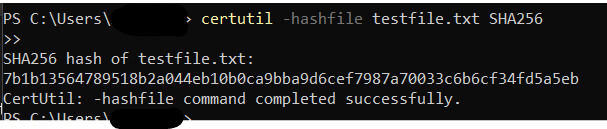 Initial SHA256 hash generation using CertUtil.
CertUtil is a built-in Windows utility that, among other things, generates cryptographic hashes of files. I used it to demonstrate the basic integrity-check workflow: hash a file, modify it, hash again, compare. The same workflow underpins anything that needs to detect tampering, whether that is forensic preservation, backup verification, or signature-based malware detection.
Test Setup
 testfile successfully created and placed.
I created a sample file named testfile.txt, inserted simple text, and then used CertUtil to generate its hash. Afterwards, I modified the file to simulate tampering, then restored it to demonstrate hash matching.
After creating the sample file, i made a copy, so that it can be tampered with:
 Copy of testfile.txt.
Then i tested the hashes:
 Identical SHA256 hash generation proven.
Afterwards, i tampered with the copied file, and tested the hashes again:
 Initial SHA256 hash is now different.
I also tested SHA1 and SHA512.
Different hash algorithm visible.
The exercise lines up with the Cryptographic Concepts section of Security+, but the more useful takeaway is operational. Any time you download a file from somewhere you do not fully trust, the published hash and a CertUtil -hashfile against your copy answers the “did this arrive intact” question in one command. No installer, no third-party tool, no excuse not to.
The same trick scales: baseline a known-good system, hash the binaries you care about, and you have a cheap tripwire for tampering.